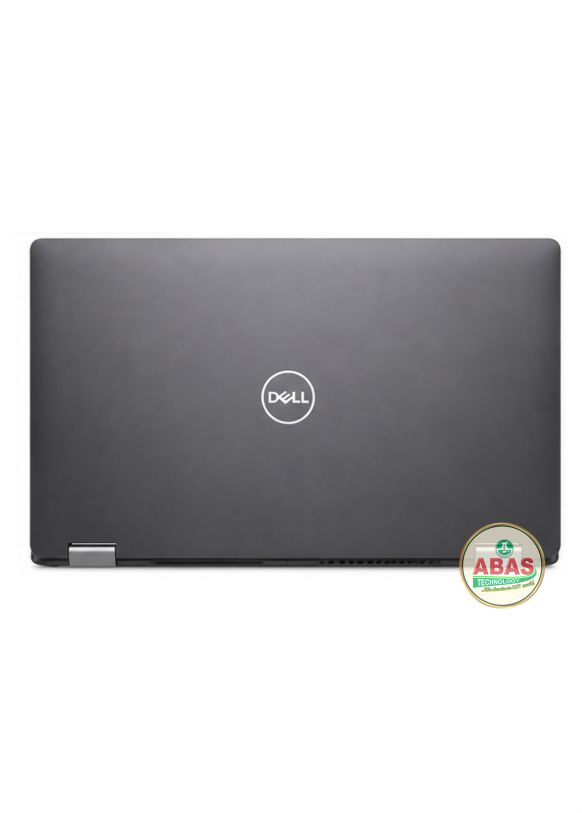
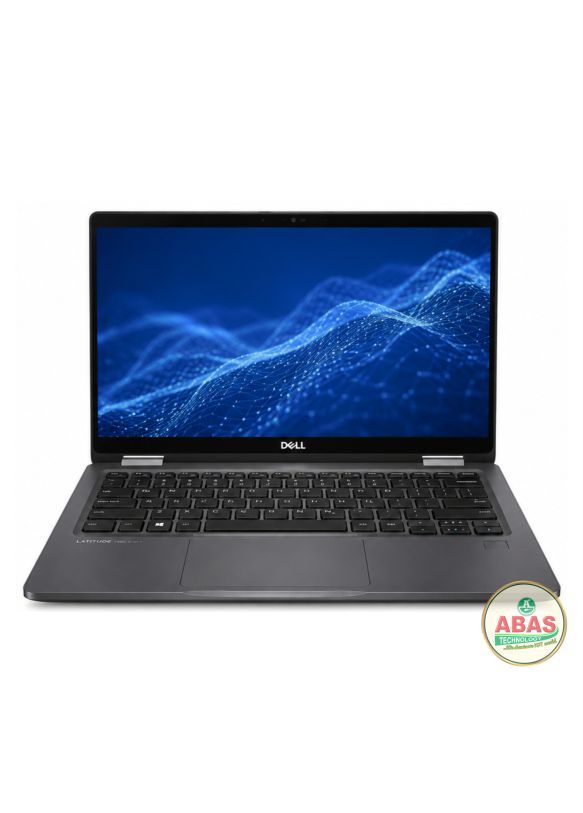
DELL LATITUDE 7400 2-IN-1 i7 PRICE AND SPECIFICATIONS
Original price was: ₦100.00.₦80.00Current price is: ₦80.00.
Description
DELL LATITUDE 7400 2-IN-1 i7 SPECIFICATIONS
DELL LATITUDE 7400 2-IN-1 i7 PRICE AND SPECIFICATIONS
Model: Dell Latitude 7400 2-in-1 i7
Operating System: Windows 10 Pro, Windows 10 Home, Windows 11 compatible
Storage: 512GB SSD
RAM: 16GB RAM
Display: 14.0-inch Full HD 1920 × 1080 touchscreen, 10-point multi-touch, active stylus capable
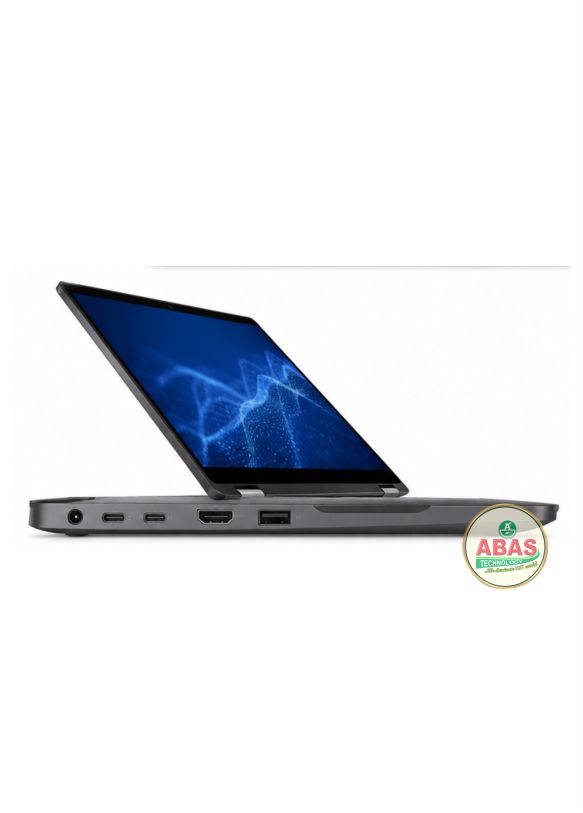
Other Features: Wi-Fi, Bluetooth, Gigabit Ethernet via adapter/dock, HDMI 1.4, 2 × Thunderbolt 3 USB-C, 2 × USB-A, microSD card reader, HD/IR webcam options, stereo speakers, backlit keyboard, optional fingerprint reader, optional NFC, TPM 2.0 and 360° 2-in-1 convertible design.
DELL LATITUDE 7400 2-IN-1 i7 PRICE AND SPECIFICATIONS
The Dell Latitude 7400 2-in-1 is a premium 14-inch business convertible laptop designed for professionals, executives, students and mobile users. Its 360-degree hinge allows it to be used as a traditional laptop, tablet, tent or stand.
It uses 8th Generation Intel Core processors, integrated Intel UHD Graphics 620, soldered LPDDR3 memory and M.2 SSD storage. Dell offered configurations with up to 16GB of RAM and 1TB of storage.
It is suitable for Microsoft Office, programming, accounting, business applications, browsing, Photoshop, CorelDRAW, Canva, online classes, moderate multitasking and light creative work.
General Information – DELL LATITUDE 7400 2-IN-1 i7 PRICE AND SPECIFICATIONS
- Model: Dell Latitude 7400 2-in-1
- Series: Dell Latitude
- Series Class: Latitude 7000
- Laptop Type: Premium Business Convertible
- Screen Size: 14 inches
- Aspect Ratio: 16:9
- Display: Full HD touchscreen
- Convertible: Yes, 360-degree hinge
- Stylus Support: Yes
- Operating Systems:
- Windows 10 Pro
- Windows 10 Home
- Windows 11 compatible
- Build: Premium business-class chassis
Processor (CPU)
Available processors include:
- Intel Core i5-8265U
- Intel Core i5-8365U
- Intel Core i7-8665U
All are 8th Generation Intel Core Whiskey Lake processors with four CPU cores. Dell lists these processors for the Latitude 7400 2-in-1.
Processor Features
- 8th Generation Intel Core
- 4 cores
- 8 threads
- Intel Turbo Boost
- Intel Hyper-Threading
- Intel UHD Graphics 620
- 15W mobile processor platform
- Intel vPro available on selected configurations
Maximum Turbo Speeds
- Core i5-8265U: Up to 3.9 GHz
- Core i5-8365U: Up to 4.1 GHz
- Core i7-8665U: Up to 4.8 GHz
The Core i5-8265U and i5-8365U provide excellent value, while the Core i7-8665U offers the highest CPU performance available for this model.
Graphics
Integrated Graphics
- Intel UHD Graphics 620
- Integrated graphics
- Shared system memory
- No dedicated NVIDIA or AMD GPU
Dell specifies Intel UHD Graphics 620 as the graphics controller, with HDMI 1.4a and USB-C display output.
Suitable Graphics Tasks
The Latitude 7400 2-in-1 can handle:
- Microsoft Office
- Canva
- CorelDRAW
- Adobe Photoshop
- Basic photo editing
- Basic graphic design
- Full HD video playback
- Web browsing
- Programming
- Business applications
- Light video editing
- External displays
Graphics Limitations
It is not designed for:
- High-end gaming
- Heavy 3D rendering
- Advanced 3D animation
- Professional CAD rendering
- Heavy 4K video editing
- GPU-intensive engineering applications
Memory (RAM)
- Type: LPDDR3 SDRAM
- Speed: 2133 MHz
- RAM slots: None
- RAM is soldered to the motherboard
- Available RAM: 8GB / 16GB
- Maximum RAM: 16GB
Dell specifically states that the memory is soldered and cannot be upgraded after purchase.
Recommended RAM
For normal office work:
8GB
For multitasking:
16GB
For professional productivity:
16GB
If buying a used Latitude 7400 2-in-1, I recommend choosing the 16GB version, because the RAM cannot be upgraded later.
Storage
Depending on configuration, the Latitude 7400 2-in-1 supports:
- 128GB SSD
- 256GB SSD
- 512GB SSD
- 1TB SSD
Storage options include M.2 PCIe x4 and SATA 3 SSD configurations.
Storage Features
- M.2 SSD
- PCIe NVMe support
- SATA 3 support
- 128GB–1TB options
- Fast boot and application loading
Recommended Storage
For basic use:
256GB SSD
For business/productivity:
512GB SSD
For large files:
1TB SSD
A 512GB NVMe SSD is the recommended configuration for most users.
Display
The Latitude 7400 2-in-1 features a:
- 14.0-inch display
- 1920 × 1080 Full HD resolution
- 16:9 aspect ratio
- WVA panel
- Anti-reflective / anti-smudge surface
- 10-point multi-touch
- Active stylus support
- 60 Hz refresh rate
- Approximately 300-nit brightness on the specified panel
Dell confirms the 14-inch Full HD touchscreen and active stylus capability.
2-in-1 Modes
The 360-degree hinge allows:
- Laptop mode
- Tablet mode
- Tent mode
- Stand mode
This makes it particularly useful for presentations, note-taking and touchscreen applications.
Build Quality
- Premium business-class construction
- 360-degree convertible hinge
- Compact professional design
- Durable Latitude 7000-series chassis
- Designed for business users
- Portable
- Touchscreen convertible design
The Latitude 7400 2-in-1 is a more premium machine than the Latitude 3380 and Latitude 5300.
Keyboard & Touchpad
Depending on configuration:
- Full-size keyboard
- Backlit keyboard
- Precision touchpad
- Multi-touch gestures
- Comfortable business keyboard
- Optional NFC integrated into touchpad
The keyboard is suitable for:
- Programming
- Office work
- Typing
- Data entry
- Accounting
- Business applications
- School work
- Long working sessions
Battery
Available battery options include:
- 4-cell 52 Wh Polymer battery
- 6-cell 78 Wh Polymer battery
- ExpressCharge support
- Long Life Cycle battery option
Dell’s technical specifications list both 52 Wh and 78 Wh battery options.
Actual battery life depends on:
- Battery health
- Display brightness
- Wi-Fi usage
- Processor workload
- Touchscreen usage
- Operating system
- Battery capacity
For a used unit, battery health should be checked before purchase.
Connectivity
Wireless
- Wi-Fi
- Bluetooth
- Optional WWAN
- Optional mobile broadband
- NFC on selected configurations
Wired
The laptop does not rely on a built-in RJ-45 port in the same way as larger Latitude models; Ethernet can be provided through a compatible USB-C/Thunderbolt dock or adapter.
Ports
The Dell Latitude 7400 2-in-1 includes:
- 2 × USB 3.1 Gen 1 Type-A
- 2 × USB Type-C / Thunderbolt 3
- USB-C Power Delivery
- DisplayPort over USB-C
- HDMI 1.4
- microSD card reader
- Universal audio jack
- Noble wedge security lock
- Optional micro-SIM slot
- Optional Smart Card reader
Dell confirms the two Thunderbolt 3-capable USB-C ports, two USB-A ports, HDMI, microSD and audio connections.
Webcam
Depending on configuration:
- HD webcam
- IR camera option
- Integrated microphones
- Windows Hello support on compatible configurations
Suitable for:
- Zoom
- Microsoft Teams
- Skype
- Google Meet
- Online classes
- Video conferencing
- Remote work
The IR camera configuration provides additional Windows Hello functionality.
Audio
- Stereo speakers
- MaxxAudio Pro
- Dual-array microphones
- Noise-reduction microphones
- Universal audio jack
Dell lists two stereo speakers with MaxxAudio Pro and dual-array microphones.
Suitable for:
- YouTube
- Music
- Movies
- Video conferencing
- Online classes
- Presentations
- General entertainment
Security Features
Business security features can include:
- TPM 2.0
- Fingerprint reader
- IR camera
- Windows Hello
- BIOS password
- System password
- Noble wedge lock
- Optional Smart Card reader
- Secure Boot
- Dell security features
- Optional vPro
The fingerprint reader is integrated into the power button on selected configurations.
Dimensions
Approximately:
- Width: 320.6 mm
- Depth: 208.5 mm
- Thickness: approximately 16.9–17.7 mm
Its compact dimensions make it well suited for carrying between home, school and office.
Weight
- Approximately 1.36 kg depending on configuration
The exact weight varies according to battery, display and other configuration options.
Upgrade Options
Users can replace or upgrade:
- M.2 SSD
- Battery
- Wireless components
- Some internal service components
RAM Upgrade
RAM cannot be upgraded.
The memory is soldered directly to the motherboard. Dell offers the machine with either 8GB or 16GB LPDDR3, so it is important to choose the desired RAM capacity when purchasing.
Storage Upgrade
The M.2 SSD can be replaced with a compatible larger SSD.
Recommended Configuration
16GB RAM + 512GB NVMe SSD
This is the configuration I would recommend for a used Latitude 7400 2-in-1.
Non-Upgradable Components
- Processor is soldered
- RAM is soldered
- Intel UHD Graphics 620 is integrated into the processor
Performance
The Dell Latitude 7400 2-in-1 is ideal for:
- Microsoft Word
- Microsoft Excel
- Microsoft PowerPoint
- Web browsing
- Programming
- Software development
- Accounting software
- CorelDRAW
- Adobe Photoshop
- Canva
- Light graphic design
- Online classes
- Zoom
- Microsoft Teams
- Business applications
- Heavy office multitasking
- Light video editing
- Presentations
- Touchscreen applications
- Digital note-taking
This configuration is suitable for business work, programming, accounting, Photoshop, CorelDRAW, Canva, presentations, online learning, heavy office multitasking and light video editing.
For high-end gaming, advanced 3D design, professional 4K video editing, heavy CAD rendering or GPU-intensive workloads, a laptop with a dedicated NVIDIA or AMD GPU would be a better choice.
Related products
-
Sale!
DELL LATITUDE 3380 i5 PRICE AND SPECIFICATIONS
Original price was: ₦100.00.₦80.00Current price is: ₦80.00. Add to cartWhatsApp us -
Sale!
DELL LATITUDE 5300 i5 PRICE AND SPECIFICATIONS
Original price was: ₦100.00.₦80.00Current price is: ₦80.00. Add to cartWhatsApp us -
Sale!
DELL LATITUDE 7400 2-IN-1 i5 PRICE AND SPECIFICATIONS
Original price was: ₦100.00.₦80.00Current price is: ₦80.00. Add to cartWhatsApp us -
Sale!
DELL LATITUDE 5300 i7 PRICE AND SPECIFICATIONS
Original price was: ₦100.00.₦80.00Current price is: ₦80.00. Add to cartWhatsApp us
Reviews
There are no reviews yet.