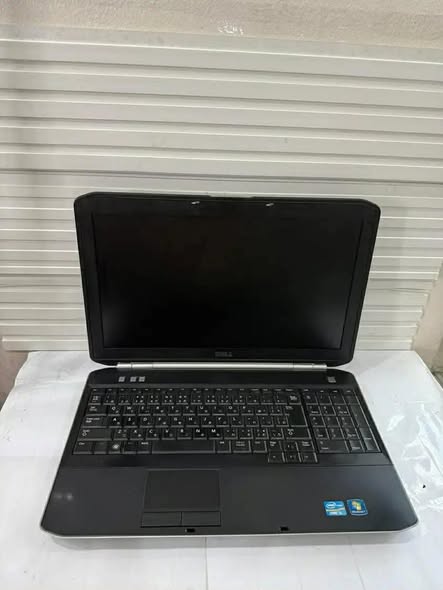
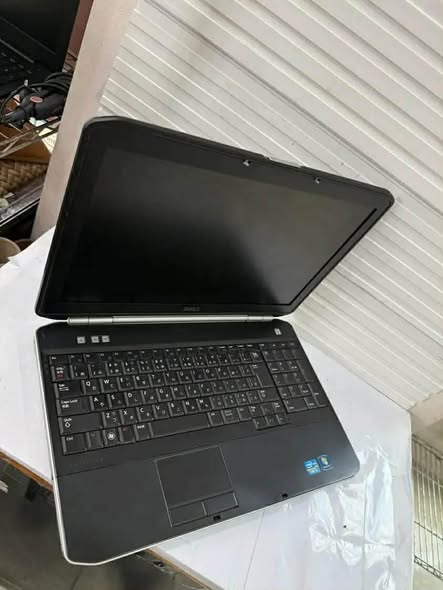
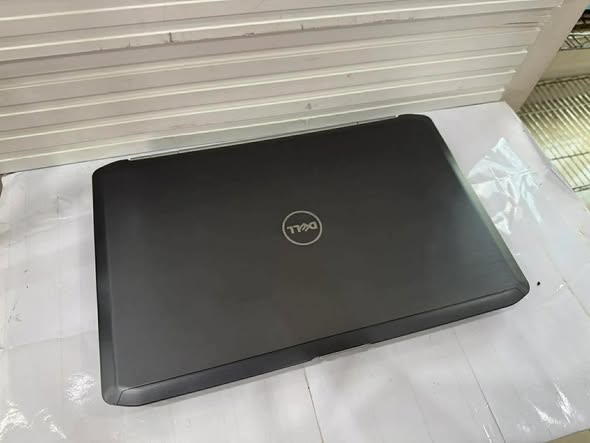
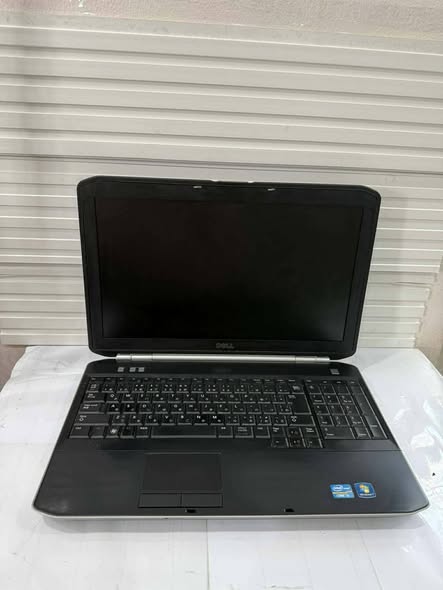
Dell Latitude E5520 Specification/Price in Nigeria
Description
Dell Latitude E5520 Specification/Price in Nigeria
Overview
The Dell Latitude E5520 is a 15.6-inch business-oriented notebook released in 2011, featuring a durable “Tri-Metal” casing (magnesium alloy internal frame, brushed aluminum display back) designed for everyday work. It is part of the 2nd Generation Intel Core processor family, frequently configured with Intel Core i3 or i5 processors (Sandy Bridge architecture).
The Dell Latitude E5520 is a business-class laptop designed primarily for professionals, students, and organizations that require durability, reliability, and solid performance for everyday computing tasks. Released as part of Dell’s Latitude E-series lineup, the E5520 was built with productivity in mind rather than flashy entertainment features.
It is widely known for its strong chassis, dependable keyboard, and ability to handle office work smoothly. Many users still rely on it today for tasks such as documentation, internet browsing, graphic design basics, business applications, and educational use.
Processor (CPU)
The Latitude E5520 is powered by Intel’s 2nd Generation Core processors (Sandy Bridge family). Depending on configuration, it comes with:
- Intel Core i3
- Intel Core i5
- Intel Core i7
These processors deliver stable performance for multitasking, office applications, and light creative work.
The Core i5 and i7 variants especially provide:
- Faster processing speed
- Better multitasking
- Improved power efficiency
This makes the system capable of handling software like Microsoft Office, CorelDRAW, browsing tools, and even light video editing.
Display (Screen Quality)
The laptop features a 15.6-inch display, offering comfortable viewing for long work sessions.
Display options include:
- HD (1366 × 768)
- HD+ (1600 × 900)
The screen provides:
- Good brightness
- Decent color reproduction
- Anti-glare technology
The anti-glare finish makes it ideal for outdoor use or bright office environments.
Memory (RAM)
The Dell Latitude E5520 supports:
- 2GB RAM (basic use)
- 4GB RAM (recommended)
- Up to 8GB RAM (maximum supported)
With upgraded RAM:
- Multitasking becomes smoother
- Software runs faster
- System responsiveness improves
For modern productivity tasks, 8GB RAM is ideal.
Storage (Hard Drive / SSD)
Storage options include:
- 250GB HDD
- 320GB HDD
- 500GB HDD
Users can upgrade to:
- Solid State Drive (SSD)
Upgrading to SSD significantly improves:
- Boot speed
- Application loading
- Overall system performance
SSD is highly recommended for modern usage.
Graphics (GPU)
The E5520 comes with either:
- Integrated Intel HD Graphics
- Dedicated NVIDIA graphics (in some models)
Integrated graphics handle:
- Office tasks
- Video playback
- Light design work
The dedicated NVIDIA option improves:
- Visual performance
- Light gaming capability
- Graphics applications
Build Quality & Design
Dell built the Latitude E5520 with durability as a top priority.
Key design features include:
- Strong metal hinges
- Reinforced chassis
- Professional matte finish
It is built to withstand:
- Daily handling
- Office mobility
- Long-term use
This makes it suitable for field work and business travel.
Keyboard & Touchpad
The keyboard is one of the laptop’s strongest features.
It offers:
- Comfortable typing
- Good key spacing
- Spill-resistant design
The touchpad is:
- Responsive
- Smooth
- Equipped with dedicated click buttons
Typing for long hours feels natural and fatigue-free.
Ports & Connectivity
The E5520 includes a wide range of connectivity options:
- USB ports
- HDMI
- VGA
- Ethernet LAN
- SD Card Reader
- Audio jack
Wireless options:
- Wi-Fi
- Bluetooth
This ensures compatibility with both modern and legacy devices.
Battery & Power
Battery life is reliable for business use.
It offers:
- 4 to 6 hours depending on usage
- Efficient power consumption
With proper battery health, it supports:
- Office work
- Online meetings
- Study sessions
Security Features
Security is a major strength of the Latitude series.
The E5520 includes:
- Fingerprint reader (optional)
- TPM (Trusted Platform Module)
- Smart card support
Operating System
Windows 10 Pro (64-bit) and Windows 11 Pro (with compatible CPU & TPM)
How to order a product?
To order a product, scan through our available products and select any item of your choice. Once you have chosen the product, provide your contact details, delivery address, and preferred payment method. After confirming your order, you will receive a notification containing your order and other important details.
All products come with an invoice from Abas Technology/bizmall.com and must be presented for any warranty claim.
Claims without proof of purchase will not be accepted. Each product comes with a warranty seal; if broken or tampered with, the warranty becomes void immediately.
Once your order shows on our website, we will confirm and dispatch your product within 24 hours. If you are in Nigeria, expect your product within 3 days depending on your location in Nigeria.
Safety Tips
- • Payments are maintained securely by us
- • We protect your money until you receive the item
- • Inspect the item upon delivery
- • Support is available 24/7 if you need help
Related products
-
Sale!
Dell latitude 7440 i7 Specification/Price in Nigeria
Original price was: ₦230,000.00.₦225,000.00Current price is: ₦225,000.00. Add to cartWhatsApp us -
Sale!
Dell Latitude 7470 Specification/Price in Nigeria
Original price was: ₦250,000.00.₦230,000.00Current price is: ₦230,000.00. Add to cartWhatsApp us -
Sale!
Hp 1030 G2 i5 Price / Specification in Nigeria
Original price was: ₦480,000.00.₦475,000.00Current price is: ₦475,000.00. Add to cartWhatsApp us -
Sale!
Hp Elitebook 840 G7 i5 (Non-Touchscreen) Prices / Specification in Nigeria
Original price was: ₦398,000.00.₦388,000.00Current price is: ₦388,000.00. Add to cartWhatsApp us