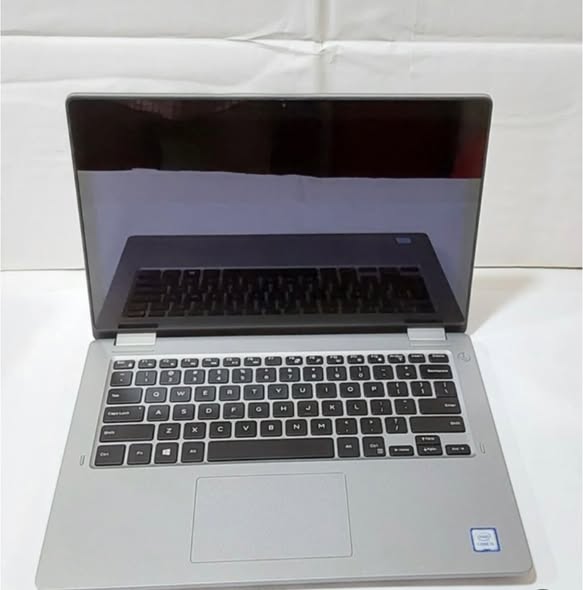
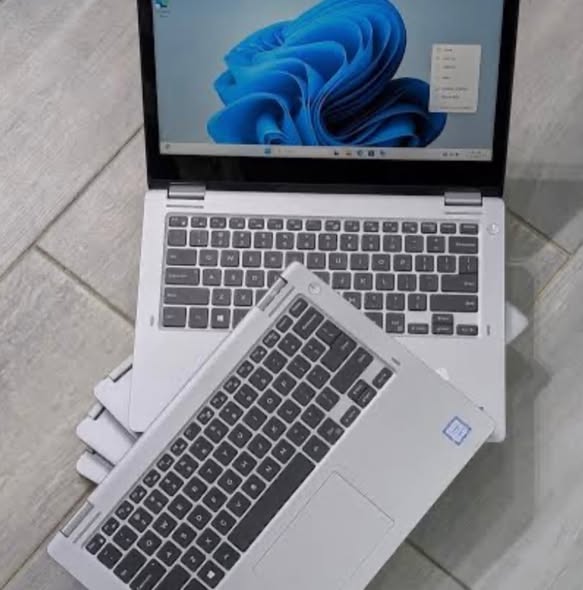
Dell Latitude 3310 Specification/Price in Nigeria
Description
Dell Latitude 3310 Specification/Price in Nigeria
Overview
The Dell Latitude 3310 is a compact, business‑focused laptop that balances performance, portability, and productivity. It belongs to Dell’s Latitude 3000 series — a lineup designed for students, professionals, and small business users who need a reliable daily‑use machine without the higher price of premium models.
Key strengths of the Latitude 3310 include:
✔ Lightweight design
✔ Practical performance for everyday tasks
✔ Energy‑efficient processors
✔ Solid security and business features
This laptop handles office software, web development, browsing, video conferencing, and basic graphics tasks comfortably — making it useful for your roles as a WordPress editor and graphics design tutor.
Processor (CPU)
The Dell Latitude 3310 is powered by Intel’s 6th Generation Skylake processors, such as:
- Intel Core i3‑6100U
- Intel Core i5‑6200U
These CPUs are:
✔ Dual‑core
✔ Designed for energy efficiency
✔ Support Hyper‑Threading (i5 models)
Typical speeds:
- Base Frequency: ~2.3 GHz
• Turbo Boost (on i5): up to ~2.8 GHz
Benefits:
✔ Smooth operation for business apps
✔ Efficient multitasking
✔ Good performance for documents, spreadsheets, and web apps
These CPUs aren’t meant for heavy gaming but confidently handle regular productivity workloads.
Display (Screen Quality)
The Latitude 3310 includes a 13.3‑inch anti‑glare LED display.
Display specs typical for this series:
🔹 Resolution: 1366 × 768 (HD)
🔹 Anti‑glare coating
Features and user impact:
✔ Reduced reflection for productivity
✔ Comfortable for long typing sessions
✔ Perfectly fine for basic design work and browsing
While not Full HD, the screen does well for daily work, research, content editing, and light graphic previews.
Memory (RAM)
The Latitude 3310 uses DDR3L RAM.
Typical configurations include:
- 4 GB RAM
- 8 GB RAM
- Upgradeable up to 8 – 16 GB (varies by model)
Benefits of higher memory:
✔ Faster application switching
✔ Better handling of browser tabs
✔ Improved performance in design programs
For smoother multitasking and design work, 8 GB+ is ideal.
Storage (Hard Drive / SSD)
The Latitude 3310 supports upgradable storage, typically:
📌 2.5‑inch HDD
📌 128 GB – 256 GB SSD
SSD benefits:
✔ Faster booting
✔ Quicker application load times
✔ More responsive system overall
An SSD is highly recommended for daily productivity, education tasks, and graphic software.
Graphics (GPU)
Graphics options are primarily integrated Intel:
👉 Intel HD Graphics 520
This GPU supports:
✔ HD video playback
✔ Video calls
✔ Office graphics
✔ Light design work (e.g., basic CorelDRAW tasks)
Not designed for demanding 3D games or complex rendering, but works well for basic multimedia and editing.
Build Quality & Design
The Latitude 3310 is known for its simple but practical design:
✔ Durable plastic chassis
✔ Matte finish
✔ Compact and lightweight
Weight: Approximately 1.4 – 1.6 kg
This makes it:
✔ Easy to carry
✔ Comfortable in classrooms or meetings
✔ A good choice for professionals on the move
Keyboard & Touchpad
The keyboard is:
✔ Full‑size with good key travel
✔ Comfortable for long typing sessions
✔ Ideal for office work, writing, and content creation
The touchpad:
✔ Responsive
✔ Supports multi‑touch gestures
Overall, typing and navigation are smooth and well‑suited for productivity tasks.
Ports & Connectivity
Even in a compact chassis, the Latitude 3310 offers useful connectivity:
Ports
- USB 3.0
• USB 2.0
• HDMI
• SD Card Reader
• Ethernet (RJ‑45)
• Headphone/Mic jack
Wireless
✔ Wi‑Fi
✔ Bluetooth
These allow connection to:
✔ External displays
✔ Projectors
✔ Flash drives
✔ Wireless accessories
Good connectivity makes it reliable for presentations, teaching, and meetings.
Battery & Power
Battery specifications vary by model, but generally include:
✔ 3‑cell or 4‑cell battery packs
Typical battery life:
👉 ~6 – 8+ hours depending on usage and configuration
This makes it suitable for:
✔ Full workdays
✔ College lectures
✔ Remote tasks without frequent charging
Security Features
As part of Dell’s business lineup, the 3310 includes useful security options:
✔ TPM (Trusted Platform Module)
✔ Password protection
✔ BIOS security
Operating System
Windows 10 Pro (64-bit) and Windows 11 Pro (with compatible CPU & TPM)
How to order a product?
To order a product, scan through our available products and select any item of your choice. Once you have chosen the product, provide your contact details, delivery address, and preferred payment method. After confirming your order, you will receive a notification containing your order and other important details.
All products come with an invoice from Abas Technology/bizmall.com and must be presented for any warranty claim.
Claims without proof of purchase will not be accepted. Each product comes with a warranty seal; if broken or tampered with, the warranty becomes void immediately.
Once your order shows on our website, we will confirm and dispatch your product within 24 hours. If you are in Nigeria, expect your product within 3 days depending on your location in Nigeria.
Safety Tips
- • Payments are maintained securely by us
- • We protect your money until you receive the item
- • Inspect the item upon delivery
- • Support is available 24/7 if you need help
Related products
-
Sale!

Hp Elitebook 840 G5 i7 Specification/Price in Nigeria
Original price was: ₦330,000.00.₦325,000.00Current price is: ₦325,000.00. Add to cartWhatsApp us -
Sale!
Hp 1030 G2 i7 Price / Specification in Nigeria
Original price was: ₦500,000.00.₦495,000.00Current price is: ₦495,000.00. Add to cartWhatsApp us -
Sale!
MacBook Air 2015 Specification/Price in Nigeria
Original price was: ₦300,000.00.₦290,000.00Current price is: ₦290,000.00. Add to cartWhatsApp us -
Sale!
Dell Latitude 5400 Specification/Price in Nigeria
Original price was: ₦310,000.00.₦300,000.00Current price is: ₦300,000.00. Add to cartWhatsApp us