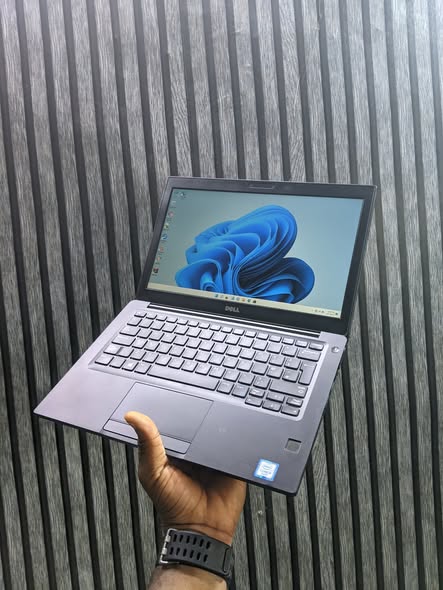
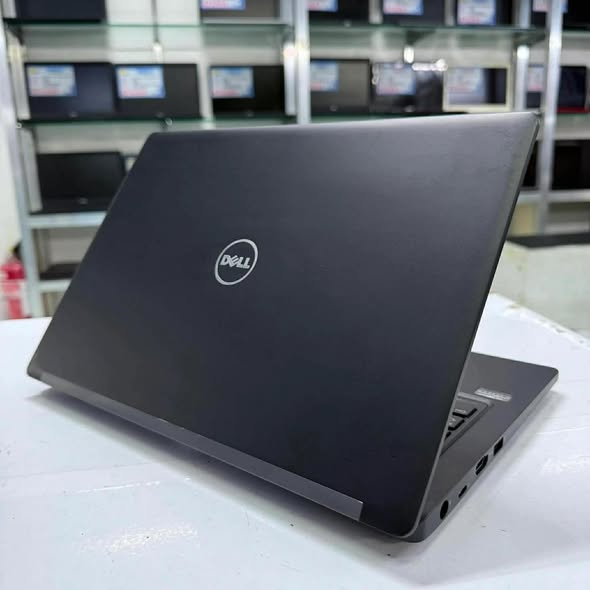
Dell Latitude 5280 Specification/Price in Nigeria
Description
Dell Latitude 5280 Specification/Price in Nigeria
Overview
The Dell Latitude 5280 is a compact business-class laptop designed for professionals who need a balance of performance, portability, and enterprise-grade security. It sits in Dell’s Latitude lineup focused on reliability, manageability, and durability — often used in corporate environments where stability and support matter. It’s known for solid performance, a comfortable keyboard, and a broad selection of ports for business peripherals.
Processor (CPU)
Dell Latitude 5280 models come with 7th-generation Intel® Core processors — from Core i3 to Core i7 options:
- Intel Core i3-7100U – entry-level, energy-efficient
- Intel Core i5-7200U / i5-7300U – mid-range performance for everyday business tasks
- Intel Core i7-7600U – highest performance with faster turbo speeds
All are dual-core CPUs with Hyper-Threading, suitable for business applications, multitasking with productivity software, and typical office workflows.
Display (Screen Quality)
The Dell Latitude 5280’s screen options include:
- 12.5″ HD (1366 × 768) anti-glare
- 12.5″ FHD (1920 × 1080) anti-glare
- 12.5″ FHD (1920 × 1080) touchscreen with Corning Gorilla Glass 4 (higher brightness/anti-reflective)
The FHD option delivers noticeably sharper visuals and better viewing angles than the base HD panel, while the touchscreen adds flexibility for interactive tasks.
Memory (RAM)
- DDR4 memory
- Up to 32 GB supported across two DIMM slots
This is excellent for a compact business laptop, allowing you to run multiple browser tabs, office software, and background services smoothly. Many units ship with 8 GB or 16 GB.
Storage (Hard Drive / SSD)
Storage choices vary:
- M.2 SATA SSD up to 512 GB
- M.2 PCIe/NVMe SSD up to 512 GB
- Mechanical HDD options up to 1 TB (more common on lower-end configurations)
SSDs provide faster boot-up times, quicker file access, and better overall responsiveness than HDD options.
Graphics (GPU)
Graphics are handled by Intel® HD Graphics 620, integrated in the CPU:
- Good for everyday productivity, video playback, presentations, and light multimedia work
- Not meant for demanding 3D gaming or high-end creative workflows
This is typical of business notebooks where the focus is on efficiency rather than graphics performance.
Build Quality & Design
The Dell Latitude 5280 features a sturdy chassis built for daily professional use:
- Compact 12.5″ form factor — easy to carry
- Business-grade materials designed for durability
- Tested for reliability in enterprise deployment
It’s not flashy, but it’s solid and practical, designed to withstand travel and daily work rigors.
Keyboard & Touchpad
- Spill-resistant keyboard with typical Latitude firm, comfortable key action
- Backlit keyboard available on many configurations
- Precision touchpad that’s responsive with multitouch gestures
Reviews often highlight the keyboard as one of the strong points for extended typing sessions, especially in business use.
Ports & Connectivity
Dell Latitude 5280 has a good selection of ports for productivity and legacy support:
- USB-C (with DisplayPort Alt Mode)
- USB-A 3.0 (some with PowerShare)
- HDMI
- VGA (valuable for older projectors)
- RJ-45 Ethernet
- SD card reader
- Headphone/mic combo jack
- Optional SIM card slot on some units
This mix of old and new ports makes it flexible in office environments without needing many dongles.
Battery & Power
- Typical battery: 51 Wh, 3-cell
- Some models (especially with i7 and larger displays) use upgraded 68 Wh batteries
In Laptop Mag testing, the Latitude 5280 with a larger battery lasted over 12 hours in web browsing tests — an impressive result for a small business laptop.
Security Features
Being a business laptop, the Dell Latitude 5280 includes important security features:
- Trusted Platform Module (TPM) for secure encryption
- Optional fingerprint reader on many configurations
- Optional smart card reader
- Support for Dell’s enterprise security and management tools (e.g., BIOS controls, remote tools)
These help protect data and integrate into corporate IT environments.
Operating System
Windows 10 Pro (64-bit) and Windows 11 Pro (with compatible CPU & TPM)
How to order a product?
To order a product, scan through our available products and select any item of your choice. Once you have chosen the product, provide your contact details, delivery address, and preferred payment method. After confirming your order, you will receive a notification containing your order and other important details.
All products come with an invoice from Abas Technology/bizmall.com and must be presented for any warranty claim.
Claims without proof of purchase will not be accepted. Each product comes with a warranty seal; if broken or tampered with, the warranty becomes void immediately.
Once your order shows on our website, we will confirm and dispatch your product within 24 hours. If you are in Nigeria, expect your product within 3 days depending on your location in Nigeria.
Safety Tips
- • Payments are maintained securely by us
- • We protect your money until you receive the item
- • Inspect the item upon delivery
- • Support is available 24/7 if you need help
Related products
-
Sale!
Dell Latitude 7470 Specification/Price in Nigeria
Original price was: ₦250,000.00.₦230,000.00Current price is: ₦230,000.00. Add to cartWhatsApp us -
Sale!

Hp Elitebook 840 G5 i7 Specification/Price in Nigeria
Original price was: ₦330,000.00.₦325,000.00Current price is: ₦325,000.00. Add to cartWhatsApp us -
Sale!
Dell Latitude 7390 X360 convertible i5 Price / Specification in Nigeria
Original price was: ₦390,000.00.₦380,000.00Current price is: ₦380,000.00. Add to cartWhatsApp us -
Sale!
HP EliteBook 850 G8 Specification/Price in Nigeria
Original price was: ₦580,000.00.₦550,000.00Current price is: ₦550,000.00. Add to cartWhatsApp us